
Now in Android #118 — Google I/O 2025 Part II

Now in Android #118 — Google I/O 2025 Part II
Compose, Camera and Media, Accessibility ,KMP, Tools, Maps, AndroidX, Google Home, integrating the web, Google Play, and more
Welcome to part two of a special Google I/O 2025 edition of Now in Android, your ongoing guide to what’s new and notable in Android development.
This second edition covers the latest from Jetpack Compose, Camera and Media, Accessibility ,Kotlin Multiplatform, Android development tools, Google Maps, AndroidX, Google Home with Gemini, integrating web functionality, Google Play, and more.
Part one included coverage of Material Expressive, watches, cars, tablets, laptops, connected displays, the latest in adaptive app development, XR development, taking advantage of on-device and cloud based AI, and Android 16.
Now in Android: 118 - What's new in Android development at Google I/O 2025 (part 2)
Most of the content of this post is available in the form of a video or podcast, so feel free to watch or listen rather than read on. (Or do all three to help you remember! There won’t be a quiz.)

Jetpack Compose 💻
Jetpack Compose introduced new features, including autofill support, auto-sizing text, visibility tracking, the animate bounds modifier, and accessibility checks in tests, and that’s just the beginning of what’s new:
- animateBounds provides automatic animations of a Composable’s position and size within a LookaheadScope, while visibility tracking is used when you need high-performance information on a composable’s position in its root container, screen, or window.
For more on autofill, autosize, and the new state based TextField, check out the “Mastering text input in Compose” talk.
- Navigation 3 is a brand new, Compose-first navigation library, now in alpha that’s designed to give you greater control while simplifying building complex navigation flows.
Announcing Jetpack Navigation 3
- Compose support for CameraX and Media3 makes it easier to integrate camera capture and video playback into your UI.
- Android Studio tools have been improved for creating Compose UIs. The latest Narwhal canary includes resizable previews, preview navigation improvements, and Gemini integration for Compose preview generation and UI transformation.
- The “Accessible UIs with Jetpack Compose” talk covers how Compose facilitates accessibility and how you can use it to build apps that are usable by everyone.
Read about What’s new in Jetpack Compose or watch the talk.

CameraX and Media3 🎬
The “Seamless video capture, editing and playback with CameraX and Media3” session covers how you can use CameraX and Media3 together with LiteRT to create video capture, sharing, and editing apps with custom effects.
CameraX simplifies camera integration (preview, capture, analysis), while Media3 Transformer handles video editing and transcoding. Media3 ExoPlayer provides flexible video playback options.
In the “Building delightful Android camera and media experiences” blog, the Android Developer Relations Camera & Media team shared learnings from creating sample media code and demos, including:
- Jetpack Media3 Transformer APIs to arrange input video sequences into different layouts using a custom video compositor.
- Jetpack Compose: Migrate your app to Jetpack Compose and use the supporting pane adaptive layout, so the UI dynamically adapts to the screen size.
- CameraX’s Media3 effect integration allows you to easily add filters and effects. You can define your own effects by implementing the GlEffect interface.
- Media3 can be used with AI to analyze video content and extract meaningful information. You can convert textual information derived from the video into spoken audio, enhancing accessibility.
- Oboe Audio API: Starting in Android 16, the new audio PCM Offload mode reduces the power consumption of audio playback in your app.
Building delightful Android camera and media experiences

Androidify: AI-driven experiences with Jetpack Compose, Gemini and CameraX 🤖
The Androidify app is an open-source project showcasing how to build AI-driven Android experiences, using Jetpack Compose, Gemini, CameraX, and Navigation 3.
The first article, “Androidify: Building powerful AI-driven experiences with Jetpack Compose, Gemini and CameraX” is a thorough introduction into how the app was architected, tested, and how many of the features were created.
The app uses the Gemini API through the Firebase AI Logic SDK to access Imagen and Gemini models. It uses Gemini models for image validation, text prompt validation, image captioning, a “help me write” feature, and image generation from the generated prompt. The UI is built with Jetpack Compose, and it adapts to different devices using WindowSizeClass. CameraX is integrated for photos, and Media3 APIs are used to load an instructional video. Screen transitions are handled using the new Jetpack Navigation 3 library.
Androidify: Building powerful AI-driven experiences with Jetpack Compose, Gemini and CameraX
The “Android Developers Blog: Androidify: Building delightful UIs with Compose” post focuses on how the user experience was built using Material 3 expressive with the MaterialExpressiveTheme and MotionScheme.expressive. The app uses the HorizontalFloatingToolbar for prompt type selection and MaterialShapes.
It leverages Jetpack Compose 1.8 to automatically adjust the font size of text composables, and uses the new onLayoutRectChanged to help make fun animation.
Androidify: Building delightful UIs with Compose
The “Androidify: How Androidify leverages Gemini, Firebase and ML Kit” post covers how Google AI is powering the new Androidify with Gemini AI models, Imagen, and the Firebase AI Logic SDK to enhance the app experience.
The app uses Gemini 2.5 Flash via Firebase to validate uploaded images, ensuring they contain a person who is in focus and that the image is safe. The app also uses Gemini 2.5 Flash with structured output to caption the image.
The detailed description of your image is used to enrich the prompt for image generation. A fine tuned version of the Imagen 3 model is called to create the bot.
The app uses the ML Kit Pose Detection API to detect when a person is in the camera view, triggering the capture button and adding visual indicators.
Androidify: How Androidify leverages Gemini, Firebase and ML Kit

Google I/O 2025: What’s new in Android development tools 🤖
The “What’s new in Android development tools” talk covered the Narwhal Feature Drop (2025.2.1) of Android Studio, bringing lots of new AI assistance features, Compose dev improvements, and more. Here are many of the highlights:
- You can now access Gemini 2.5 Pro in Android Studio
- Android Studio is getting a new Gemini-powered Version Upgrade Agent to automate upgrading dependencies.
- Journeys in Android Studio lets you use natural language to describe actions and assertions for user journeys you want to test in your app, and Gemini performs the tests for you.
- Gemini can automatically generate compose previews for you. The Compose preview has navigation improvements that let you jump to the preview definition or function. While in focus mode, you can resize the preview window to see how the UI adapts. You can also transform UI code in the preview using natural language, like “Center align these buttons.”
- You can attach image files along with your prompt, such as UI mock-ups.
- You can access the latest Android Studio AI features in stable release channels with AI features in Studio Labs.
- The App Quality Insights panel now has crash insights that analyze your app’s source code, offering explanations and source code fixes.
- The Android XR Emulator now launches by default in the embedded state, so you can deploy your application and navigate the 3D space directly inside Android Studio.
- You can now also trigger app backups on connected devices directly from the Running Devices window.
- Android Studio now offers warnings when building APKs or Android App Bundles that are incompatible with 16 KB page sized devices.
- Also, when you sign in with your Google account or a JetBrains account, you can sync your customizations and preferences across all installs.
- New Android Studio KMP project templates, updated Jetpack libraries, and new codelabs (Get Started with KMP and Migrate Existing Apps to Room KMP) have been released.
- Android Studio Cloud is now available as an experimental public preview through Firebase Studio.
- Android Studio will soon be able to offer richer insights and guidance on Google Play policies that might impact your app available in the form of lint checks.
Google I/O 2025: What's new in Android development tools
I/O 2025: What’s new in Google Play 📊
At Google I/O 2025 we highlighted new Play Console tools, updates to app discovery, changes to subscriptions, updates for games, and more:
Tools and APIs
- Overview pages in the Play Console for “Test and release” and “Monitor and improve” bring together metrics, features, and contextual advice.
- You will soon be able to halt fully-live releases through Play Console and the Publishing API.
- The Play Integrity API has stronger abuse detection, device security update checks, and a public beta for device recall.
- An asset library is available for uploading, editing, and viewing visual assets, and open metrics provide deeper insights into listing performance.
- The Play Billing Library release 8 is planned to be available to integrate with at the end of June.
App discovery updates
- New topic browse pages feature timely and relevant content, debuting in the US with Media & Entertainment.
- “Where to Watch” is expanding to more markets to help users find and deep-link into subscribed apps for movies and TV.
- Starting this July, everyone can now add a hero content carousel and a YouTube playlist carousel to their store listings.
- Audio samples are launching on Apps Home for apps best experienced through sound.
- Engage SDK content is coming to the Play Store this summer, with new content categories and Collections rolling out globally. Try the codelab!
- You can learn more about how to grow your business on Google Play in the following talk:
Subscription updates
- Multi-product checkout for subscriptions lets you sell subscription add-ons alongside base subscriptions.
- Subscription benefits are showcased in more places across Play.
- You can now choose a grace period or an account hold instead of immediate cancellation when payment methods decline.
Game updates
- Play Games on PC has expanded support, with more native PC games coming alongside the Android game catalog, and an earnback up to 15%
- Google Play Games Services is adding new features to boost player engagement, including bulk achievement creation via CSV upload and generative AI avatars for player profiles.
Check out the I/O talk or the blog post to learn more with more in-depth coverage.
I/O 2025: What's new in Google Play

Kotlin Multiplatform at Google I/O and KotlinConf 25 📱💻
At Google I/O and KotlinConf 2025, several Kotlin Multiplatform (KMP) updates were announced:
- Kotlin Multiplatform Shared Module Template — Android Studio introduced a Kotlin Multiplatform Shared Module Template that is available when you create a new module in Android Studio, supporting Jetpack libraries like Room, SQLite, and DataStore.
Announcing Kotlin Multiplatform Shared Module Template
- Demystify KMP builds and structure — Is an I/O talk that acts as a primer for Kotlin Multiplatform (KMP), covering how it enables sharing code across platforms (Android, iOS, web) resulting in faster feature delivery (e.g., StoneCo ships features 40% faster).
- More Jetpack Libraries now have KMP support — Collection. ViewModel, SavedState, and Paging are now supported alongside Room, and DataStore.
- Two new codelabs: “Getting started with Kotlin Multiplatform” and “Migrating your Room database to KMP” provide additional guidance for using KMP.
Also in Kotlin-related news:.
- Android Studio now supports Kotlin K2 mode for Android-specific features.
- Kotlin Symbol Processing (KSP2) is stable for better support of new Kotlin language features and performance.
- Google Workspace is using KMP in production in the Google Docs app on iOS.
- Google team members presented talks and live workshops at KotlinConf, covering topics such as deploying KMP at Google Workspace, the lifecycle of a Kotlin/Native object, APIs, Compose for Desktop, JSpecify, and decoupling Architecture Components.
- In Kotlin Multiplatform: Have your code and eat it too 🎂 on Android Developers Backstage, Dustin Lam and Yigit Boyar joined host Tor Norbye to chat all about Kotlin Multiplatform (KMP), which allows you to write Kotlin code and run it just about anywhere. Learn about how to make sure your code is KMP ready, avoiding platform-specific assumptions.
You can read all of the KMP updates in the blog.
Android's Kotlin Multiplatform announcements at Google I/O and KotlinConf 25
Articles 📚
And those weren’t the only highlights from the I/O season worth talking about.

Announcing Jetpack Navigation 3 🧭
As mentioned in the Compose highlights, we announced Jetpack Navigation 3 (Nav3) a Compose-first navigation library that enables you to build scalable navigation experiences.
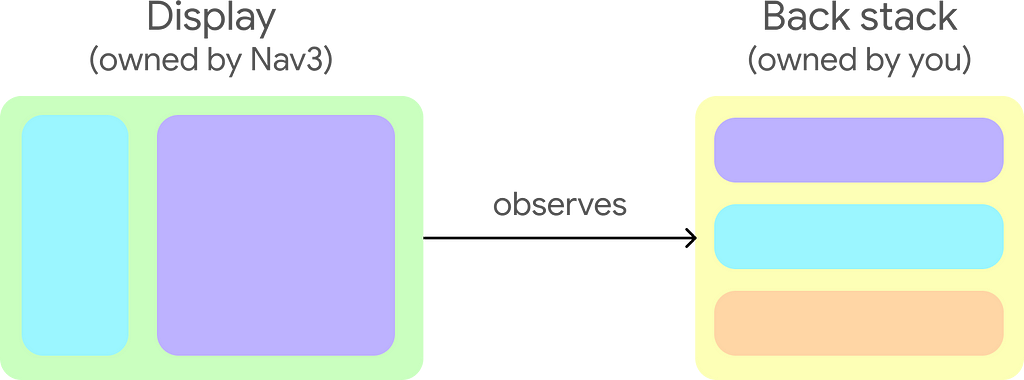
The Nav3 display observes changes to the developer-owned back stack.
With Nav3, you own the back stack, which is backed by Compose state. Nav3 provides building blocks and helpful defaults that you can use to create custom navigation behavior.
Key features:
- Built-in transition animations and a flexible API for custom animations.
- Contains Scenes, a flexible layout API that allows you to render multiple destinations in the same layout.
- Enables state to be scoped to destinations on the back stack, including optional ViewModel support via a dedicated Jetpack lifecycle library.
- Allows navigation code to be split across multiple modules.
You can navigate to the developer documentation and a recipes repository to get started.
Announcing Jetpack Navigation 3
Zoho Achieves 6x Faster Logins with Passkey and Credential Manager Integration 🔑
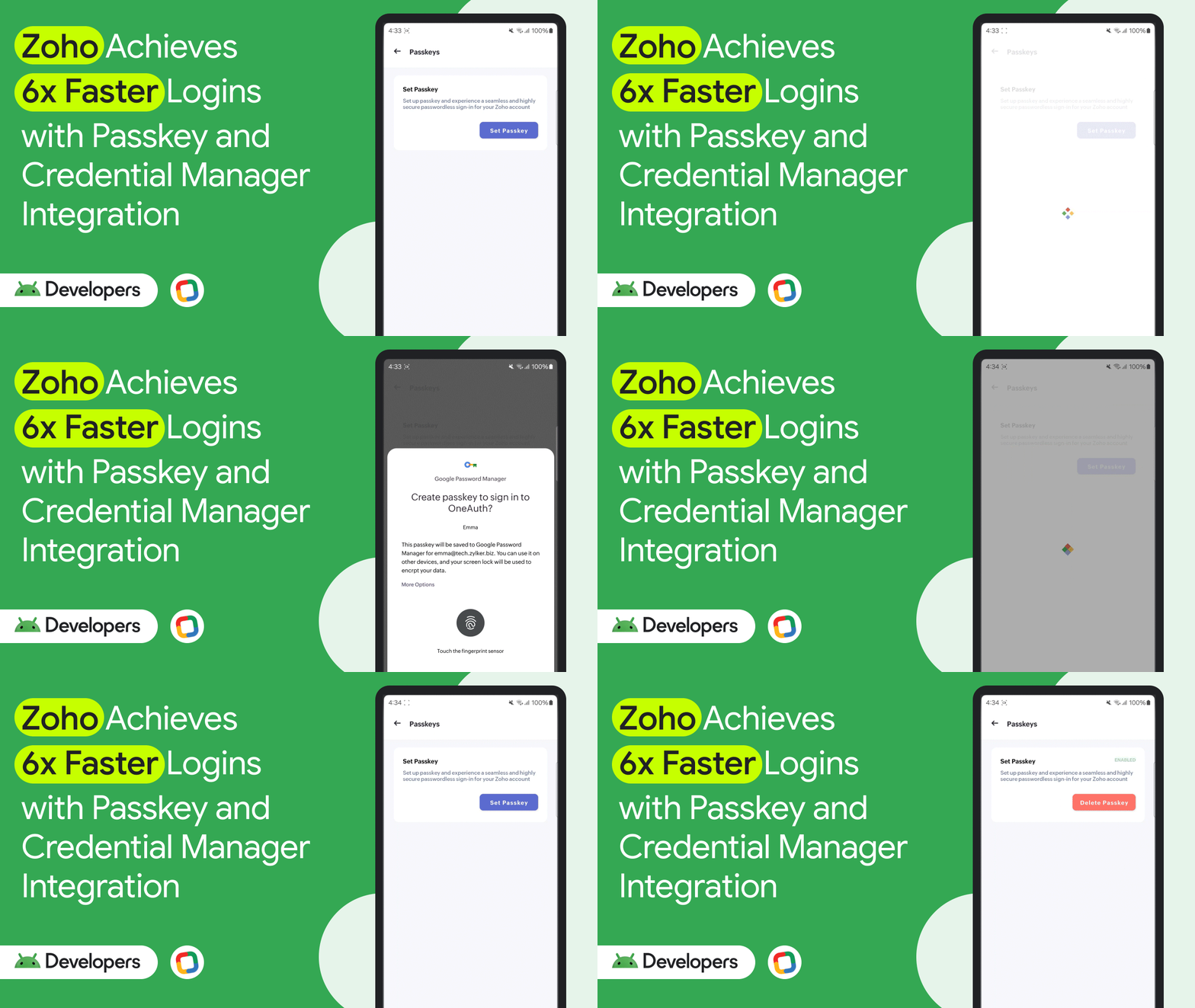
Zoho integrated passkeys and Android’s Credential Manager API into their OneAuth Android app. As a result, they achieved up to 6x faster logins and a 31% month-over-month growth in passkey adoption. Zoho’s implementation involved both client and server-side adjustments, including adapting their credential storage system and handling requests from Android devices. Based on their experience, consider leveraging Android’s Credential Manager API, optimizing error handling, educating users on passkey recovery, and monitoring adoption metrics as you implement passkeys in your apps.
Zoho Achieves 6x Faster Logins with Passkey and Credential Manager Integration
Android Studio Meerkat Feature Drop is stable 💻
The Android Studio Meerkat Feature Drop (2024.3.2) is now stable, offering features such as the Gemini Prompt Library, improved Kotlin Multiplatform (KMP) integration, and device management enhancements.
Key updates:
- Gemini Integration: Use Gemini to analyze crash reports in App Quality Insights, generate unit test scenarios, and save/share prompts with the new Prompt Library.
- Compose and UI Development: Preview themed icons and use improved zoom and collapsible groups in Compose previews.
- Build and Deploy: Add shared logic with the KMP Shared Module template and use the updated Device Manager UX. Receive warnings for deprecated SDKs from the Google Play SDK Index. The Build menu has also been refined.
- IntelliJ Platform Update: Includes the IntelliJ 2024.3 platform release with a feature complete K2 mode and debugger improvements.
Download the latest stable version of Android Studio to explore these features.
Android Studio Meerkat Feature Drop is stable
#WeArePlay: How My Lovely Planet is making environmental preservation fun through games 🌳
Clément, founder of Imagine Games, created My Lovely Planet, which combines mobile gaming with real-world action to make environmental preservation fun. In the game, planting a tree results in planting a real tree via partnerships with NGOs. According to Clément, 70% of the game’s players come through Google Play, and Google Play’s flexibility, responsiveness, and powerful testing tools improve their velocity when launching and scaling the game.
#WeArePlay: How My Lovely Planet is making environmental preservation fun through games
#WeArePlay | Google Play Console
Videos 📹
Android Accessibility Updates
“Android accessibility updates” highlights the latest Android key accessibility features and APIs, including updates to products such as Talkback and Live Captions, best practices for developing more accessible apps, and accessibility API changes in Android 16.
Key takeaways include:
- Accessibility Test Framework: The accessibility test framework can identify potential issues and throw exceptions, failing tests. Developers can customize this behavior by providing their own accessibility validator instances, allowing them to configure severity levels for failures and suppress known issues.
- Composable Previews in Android Studio: Android Studio’s composable previews can now render UI with accessibility features like dark theme, and various display and font sizes. This helps identify issues such as low contrast, non-scaling, or truncated text, and works with UI check mode to quickly identify common UI issues across different configurations.
- Automated Checks: Automated accessibility checks accelerate the detection of various accessibility barriers and complement manual testing. Developers are strongly encouraged to test apps with Android’s assistive technologies to understand user experience.
- API Changes and Best Practices: The video discusses changes in APIs and best practices related to vision, hearing, and dexterity. It emphasizes the importance of building a single adaptive mobile app that provides the best experiences across various Android surfaces and form factors.
Best practices for using web in your Android apps
“Best practices for using web in your Android apps” covers what you should do when embedding web content in your Android apps using WebView, Custom Tabs, and Trusted Web Activities (TWA). WebView allows inline display of web content with full customization, while Custom Tabs provide an in-app browsing experience powered by the user’s preferred browser (handling permissions, cookies, etc.). TWAs offer similar web features/APIs but are launched as a standard Android activity. The choice depends on the level of control and integration needed within your app.
Next-gen Android experiences with photorealistic 3D maps
“Next-gen Android experiences with photorealistic 3D maps “ introduces the new Kotlin-first Google Maps 3D SDK for Android, allowing you to create immersive map experiences with 3D capabilities. Topics covered include:
- Map 3D View: The fundamental building block for 3D maps.
- LatLngAltitude class: Used for precise positioning with altitude data.
- Camera class: For controlling the camera’s position and view, including limiting camera views to specific areas.
- Adding elements: You can add markers, 3D models, polygons, and polylines to highlight areas, define routes, or convey spatial information. Polygons are closed, filled shapes that can have holes, while polylines are not closed.
Google Home APIs, tools, and Gemini capabilities for your apps
Announcements include:
- Camera Support in the Home API: Apps will soon be able to access Gemini camera feeds for intelligent notifications (person detection, package delivery).
- Enhanced Automations: The Home API now supports suggested automations, and date/weather-based settings for greater customization.
- Gemini Integration: You will be able to integrate devices with Gemini’s AI capabilities via Google Home.
Sign up for the Developer Newsletter to be among the first to explore these cutting-edge capabilities and to stay updated on the latest developments.
Bringing Gemini intelligence to Google Home APIs
AndroidX Releases 🚀
Here’s a summary of some of the most impactful AndroidX changes. Key takeaways:
- Compose Navigation: The new Navigation3 library and its ViewModel integration are a significant shift for Compose-based apps, offering better control and lifecycle management.
- Media Enhancements: The Media3 ExoPlayer updates are extensive, improving performance, stability, and adding requested features like scrubbing mode and partial downloads.
- Passkey Improvements: Support for passkey conditional creation provides a more seamless user experience.
Navigation 3 related changes:
- androidx.navigation3:navigation3: A new navigation library specifically designed for Jetpack Compose in-app navigation. It provides core building blocks (navigation3-runtime) and a UI layer via the NavDisplay API (navigation3-ui). You control navigation by updating the state passed to NavDisplay, making it a powerful tool for Compose-based apps.
- androidx.lifecycle:lifecycle-viewmodel-navigation3: Integrates ViewModels with the new Navigation3 library. ViewModelStoreNavEntryDecorator gives each NavEntry its own ViewModelStoreOwner, ensuring ViewModels are scoped to the correct navigation destination. Crucial for managing UI state within Compose navigation.
- androidx.navigationevent:navigationevent: Provides a KMP-first API for handling system back and Predictive Back. This library serves as a replacement for Activity APIs.
- androidx.activity:activity-*:1.12.0-alpha01: Integrated with NavigationEvent 1.0.0-alpha01 via NavigationEventDispatcherOwner, allowing you to manage back navigation using NavigationEventDispatcher and NavigationEventCallback. Existing OnBackPressedDispatcher usages should continue working because it has been rewritten on top of the new library.
Media:
- androidx.media3:media3-*:1.8.0-alpha01: Significant updates to ExoPlayer, including a new scrubbing mode for frequent seeks, improvements to audio timestamp smoothing, various bug fixes (memory leaks, subtitle issues), and partial download support for both progressive and adaptive streams. Also adds PreCacheHelper to allow apps to pre-cache a single media with specified start position and duration.
Car App Library:
- androidx.car.app:app-*:1.8.0-alpha01: Adds a Media category for custom media apps, a Playback Template for controlling actions during media playback, and full support for Sectioned Item Template for complex layouts. Also introduces an extra-large grid item size.
App Functions:
- androidx.appfunctions:appfunctions-* :`1.0.0-alpha01: New library to expose app functionality to the Assistant.
Credentials:
- androidx.credentials:credentials-*: 1.6.0-alpha01 & androidx.credentials.providerevents:providerevents:1.0.0-alpha01: Supports Passkey conditional create, allowing passkeys to be created without requiring typical UI interaction from the user. Also added a new service, CredentialProviderEventsService, that credential providers can support to receive events from Credential Manager APIs.
Glance Widgets:
- androidx.glance:glance-*:1.2.0-alpha01: Adds APIs for generated previews in Glance widgets and multiprocess configurations support. Adds a new API to specify alpha for the glance Image composable and the background image modifier.
Other Updates:
- androidx.health:health-services-client:1.0.0: Stable release of the Health Services Client library for Wear OS 3 emulators and upcoming devices, with additional platforms supported in the future. Three top level API surfaces are included in this initial release: The ExerciseClient, PassiveMonitoringClient, and MeasureClient.
- androidx.hilt:hilt-*:1.3.0-alpha01: Updates the library and annotation processor to target Kotlin 2.0 to support newer Kotlin toolchain including KSP2.
- androidx.recyclerview:recyclerview-selection:1.2.0: Fixes for mouse drags and key/position mapping.
Android Developers Backstage
This was covered in the previous Kotlin Multiplatform section, but just in-case you missed it, Android Developers Backstage is back with another episode.
Kotlin Multiplatform: Have your code and eat it too 🎂
Dustin Lam and Yigit Boyar joined host Tor Norbye to chat all about Kotlin Multiplatform (KMP), which allows you to write Kotlin code and run it just about anywhere. Learn about how to make sure your code is KMP ready, avoiding platform-specific assumptions.
Now then… 👋
That’s it for part two of our I/O season coverage, with the latest around Jetpack Compose, Camera and Media, Accessibility ,Kotlin Multiplatform, Android development tools, Google Maps, AndroidX, Google Home with Gemini, integrating web functionality, Google Play, and more.
Check back soon for your next update from the Android developer universe!
Now in Android #118 — Google I/O 2025 Part II was originally published in Android Developers on Medium, where people are continuing the conversation by highlighting and responding to this story.